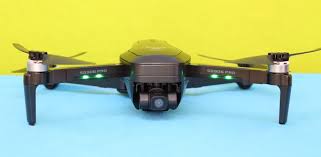
The ZLRC Beast SG906 Pro 2, also known as the “Beast 2,” has gained popularity as an affordable entry-level drone, primarily due to its standout feature: a 3-axis gimbal at a budget-friendly price point. This three-axis mechanical stabilization is its main selling point, promising smoother aerial footage than many competitors in its class. However, like many drones in this segment, keeping the Beast 2 in the air for the long haul isn’t always trouble-free. Whether you’ve just unboxed yours or have been flying it for years, you’re likely to encounter a few recurring issues. To help you get the most out of your investment, this guide covers five of the most common problems reported by users, ranging from frustrating connection glitches to hardware failures.
1. Why Won’t My Beast SG906 Pro 2 Connect to the App or Phone?
This issue is extremely common with new units and often boils down to using the wrong app or having conflicting permissions on your smartphone. Many users report that while the controller pairs with the drone immediately, their phone fails to establish the necessary Wi-Fi connection for the First Person View (FPV) feed. This is often because the drone uses a complex combination of WLAN or Bluetooth hot-spotting, and some phones have trouble switching networks quickly.
Solution: If you are facing this connection issue, you likely need to change the application you are using. The instructions might recommend “HFun Pro,” but the actual correct app for many SG906 units is the “XiL Pro App”. Additionally, failure to grant the app the necessary permissions for your phone’s storage and location services can block the connection. A full reset of the connection sequence often helps: uninstall and then reinstall the app, turn off your phone’s mobile data to force it to stay connected to the drone’s Wi-Fi network, and restart the pairing process. As a last resort, check online forums to see if your specific phone model (especially certain Android devices) is reported to have known compatibility issues with the Beast 2’s Wi-Fi module.
2. Why Is My Battery Dying Fast or Not Charging After a Few Months?
The most frequent long-term complaint regarding the Beast SG906 Pro 2 is the rapid degradation of the 7.6V 3400mAh smart battery. While the drone is marketed with up to 28 minutes of flight time, dozens of user reviews indicate a sharp decline in capacity within 6 to 12 months of normal use. Some users report that after less than a year, the battery refuses to charge past 25% or, if it reaches 100%, will only sustain flight for less than 30 seconds before auto-landing.
Solution: Battery longevity for this drone depends heavily on proper storage habits. You should never let the battery drain completely to 0%. Always charge the battery before it drops below the 20% mark; allowing it to fully exhaust will drastically shorten its lifespan. Similarly, exposure to high temperatures is a major threat to the battery’s internal cells. Avoid storing the drone in a hot car or charging it immediately after a flight while the unit is still warm. When buying replacement batteries, be careful of third-party generics—many are incompatible or fail quickly. Look for certified spares from reputable brands to ensure you are not throwing money away on poor quality.
3. My Drone Lost GPS Signal After a Crash; What Do I Do?
A common hardware issue, particularly after hard landings or crashes, is that the GPS module becomes disconnected or damaged, preventing the drone from locking onto satellites. Users often describe this as the drone “won’t go to Mode 2” on the controller (Mode 2 representing GPS-assisted flight). Although the drone might still power up and the camera might work, the “Mode” indicator stays stuck on 0 or 1, meaning the system cannot record a home point for Return-to-Home (RTH) functions. This makes manual flying risky as the drone lacks basic stabilization assistance.
Solution: First, ensure the drone is in an area with a clear, unobstructed view of the sky. If you are outdoors and the GPS still isn’t picking up after several minutes, the internal hardware may have been jarred loose during the crash. There are guides online on how to physically open the chassis to check the connection of the “GPS module” and “antenna extension cable”. However, because this is a delicate process, if you lack soldering or micro-soldering skills, it is safer to order a replacement GPS module from a spare parts vendor. Immediately contact your seller or check your warranty status before attempting any DIY internal repairs to avoid voiding your coverage.
4. The Foldable Arms Feel Loose or Snapped—Is This Normal?
Unfortunately, yes—for many owners, the plastic frame of the Beast SG906 Pro 2 is one of the first components to break, particularly at the folding joints. The consumer reviews are filled with cases of “arm snapping in two.” This has occurred both when adjusting the arm for flight and during minor rough landings, where the plastic bell housing shears off completely. Other reports mention that the screw threads on the arms were cross-threaded from the factory, causing the mechanism to crack immediately upon attempted assembly.
Solution: Once the plastic frame is broken, adhesive glue is rarely a permanent fix due to the vibration stress of the brushless motors. The most reliable solution is parts replacement. Before you throw the entire drone away, search online for the specific “SG906 Pro 2 body shell” or “arm set”. These are usually available from electronics spare parts sellers. If the drone is still under a 30-day return policy or a one-year defect warranty, do not attempt to repair it yourself; instead, push for a full return or replacement, as a cracked frame is usually considered a manufacturing defect.
5. Why Is the “4K” Video Quality So Grainy or Laggy?
Although the Beast SG906 Pro 2 is marketed as having a “4K” camera, most technical reviews and user tests confirm that the video output is effectively upscaled 1920×1080 (1080p) rather than true 4K, and the live view often suffers from choppy video lag. The hardware sensor is closer to a standard 1080p camera than a high-resolution cinema sensor. Furthermore, when coupled with the 5G Wi-Fi transmission, the live FPV stream on your phone will start to lag significantly once the drone flies further than 200 to 300 meters away. Users also report the gimbal “vibrating” erratically or the camera drifting off-center on its own over time.
Solution: Reset your expectations for the price point; this is a budget “look” rather than cinematic footage. If the lag is making the drone unflyable, reduce the video bitrate settings in the “HFun Pro” or “XiL” app to lower the data load, which reduces lag at the expense of quality. For gimbal shaking, you will need to perform a calibration: place the drone on a perfectly horizontal flat surface, keep it stationary, and hold down the designated calibration button on the controller for 5 seconds until the drone beeps. If the drift persists, a firmware update or downgrade of the camera module may be necessary.
The ZLRC Beast SG906 Pro 2 can be a very fun and capable drone for casual use, but it requires a certain level of patience and basic DIY troubleshooting. New users should immediately verify that the correct app and permissions are set up, check the folding mechanisms for defects, and learn proper battery storage habits to maximize lifespan. Long-term users should be prepared for plastic fatigue and the eventual need to hunt down spare parts online. Recognizing the difference between a software glitch (fixable) and a physical hardware failure (warranty claim) will save you from frustration and keep your Beast 2 in the skies for years to come.
Beast SG906 Pro 2 Drone – Battery SG906PRO 3400mAh
Buy Beast Drone Battery online on Batteriesglobal.co.uk United Kingdom | Large selection of Beast Batteries | Enjoy best prices | Order now!
Our brand-new Drone Battery compatible with Beast SG906PRO is engineered to deliver long-lasting and stable performance. It is designed to meet rigorous standards, ensuring full compatibility with devices such as the Beast SG906 Pro 2 Drone. This battery comes with a one-year warranty and has passed essential safety certifications including CE, RoHS, and ISO9001. Choose our Beast SG906PRO battery for a power solution that combines quality, safety, and convenience. Invest in authentic performance and keep your Beast SG906 Pro 2 Drone running like new.