Do you remember the day your Alienware 17 R4 ALW17C-D1758 first arrived? Unboxing that massive chassis, feeling the premium weight of the magnesium alloy, and booting up your first AAA title with everything maxed out was a rite of passage. For years, this machine wasn’t just a laptop; it was your mobile command center. Whether it was dominating LAN parties with friends, grinding through late-night raids, or even powering through intensive 3D rendering projects, the “King of Gaming Laptops” never let you down .
But lately, something has changed. You might have noticed it during a crucial match—the frame rates are still there, but the freedom isn’t. Once the power cord is yanked, that once-mighty beast now turns into a stationary desktop. The battery bar drops faster than a no-scope elimination, giving you maybe 30 minutes of unplugged life if you’re lucky. You find yourself constantly tethered to the wall, the whole point of owning a “mobile” rig feeling lost.
If you are scouring the internet trying to figure out why your portable powerhouse is now permanently plugged in, or if you are considering buying a used Dell Alienware 17 R4 ALW17C-D1758 but are terrified of inheriting someone else’s “dead battery” problems, you are in the right place. There is a massive amount of confusion surrounding battery health for these 2016-2017 models. Many users fall into the trap of thinking the whole laptop is dying, when in reality, it’s just one component that has naturally aged.
By the time you finish this guide, you will understand exactly what makes this machine tick, why its original power source inevitably fades, and most importantly, how to source a reliable long-lasting laptop battery that can bring this titan back to its former glory.
The Anatomy of a Legend: Built to Dominate
To understand how to power the Alienware 17 R4 ALW17C-D1758, you first have to respect the hardware it’s driving. This isn’t a casual Ultrabook; it’s a desktop replacement designed during the golden era of PC gaming.
1. The Command Center: Core Hardware
Under the hood, this beast typically houses an Intel Core i7-6820HK or the overclockable i7-7820HK processor. Known as the “Kaby Lake” architecture, this chip was designed to be pushed to its limits . Paired with 16GB or even 32GB of fast DDR4 RAM (running at 2667MHz), this machine chews through multitasking . Storage is equally impressive, usually featuring a speedy PCIe SSD for your operating system and favorite games, coupled with a massive 1TB 7200RPM hard drive for the rest of your library . This combination ensures that Windows 10 (and even Windows 11, with a bit of tweaking) flies, but it demands a lot of power.
2. The Visual Arsenal: Graphics and Display
This is where the Dell Alienware 17 R4 ALW17C-D1758 truly cemented its legacy. Equipped with the NVIDIA GeForce GTX 1070 (or the even more powerful GTX 1080) mobile GPU, it was one of the first laptops to offer true desktop-class graphics performance in a “portable” form . This is the heart of its gaming soul.
The screen is equally impressive. While base models offered a 1080p IPS display, high-end configurations boasted a stunning QHD (2560 x 1440) 120Hz panel with G-Sync . For content creators, a 4K UHD option was available. Whether you are chasing high-refresh-rate victory in competitive shooters or immersing yourself in the rich landscapes of the latest RPGs hitting the UK market (like the recent Star Wars Outlaws or Avowed), the visual fidelity remains competitive even today. However, driving that 120Hz panel or 4K resolution on battery power is an immense drain—a primary reason why a high capacity replacement laptop battery is non-negotiable for mobile use.
3. The Reality of Portability
Let’s be honest: “portable” is a relative term here. With a starting weight of 4.4 kg (almost 10 pounds), and the massive power brick adding another 1.1 kg, the Alienware 17 R4 ALW17C-D1758 is less of a laptop and more of a “luggable” . It’s built like a tank, featuring a sturdy anodized aluminum and magnesium alloy exterior with a soft-touch rubberized interior .
This brings us to the original battery. It came equipped with an 8-cell, 99 Wh Lithium-Ion powerhouse . Why 99Wh? Because that’s the maximum capacity allowed by airlines for carry-on luggage. Dell deliberately capped it here to ensure you could actually travel with it. Under ideal conditions, you might get 3 to 4 hours of light usage. But under gaming load? You’d be lucky to get an hour . As this battery chemistry ages, its ability to hold a charge degrades, leading to the dreaded “Plugged In, Not Charging” scenario or a runtime that has plummeted to mere minutes.
4. Design and Experience
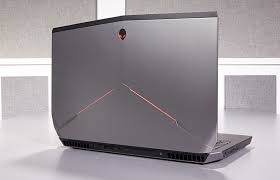
Holding the Alienware 17 R4 ALW17C-D1758 is an experience. The chassis is dominated by the iconic Alienware design language—aggressive lines, a silver lid, and a black body. The keyboard deck features a satisfying, closely-packed keyboard with a dedicated macro column on the left, fully customizable RGB lighting via the AlienFX system, which can control 12 distinct zones including the touchpad and speaker grills . It also features the Tobii eye-tracking technology embedded in the bottom bezel, allowing for supported games to track where you are looking for enhanced immersion—a feature that was years ahead of its time .
The Performance Verdict: Can It Still Compete in 2026?
With the recent buzz in the UK tech scene about the rising system requirements for new game releases and the push for Windows 11 adoption, many users wonder if their Dell Alienware 17 R4 ALW17C-D1758 is still relevant. The short answer is: absolutely, provided its power delivery is up to snuff. A failing battery can actually cripple performance, as the system may throttle components to save juice.
Core Computing Power
When fully powered by a stable source, the Core i7-7820HK still holds its own. In Geekbench 6 tests, this processor scores around 1,426 points in single-core and 4,654 points in multi-core performance . While newer chips have surpassed it, these scores are still more than adequate for smooth gaming and intensive productivity tasks. The CPU typically operates with a TDP of 45W, and Alienware’s beefy cooling solution allows it to maintain high clock speeds without immediately thermal throttling .
Graphics Processing: The Heart of Gaming
The GTX 1070 (8GB VRAM) remains a formidable 1080p gaming card. In titles like Call of Duty: Modern Warfare III or Cyberpunk 2077 (with some settings tweaked), you can expect playable frame rates. However, the true test is the 1% Low frame rates. A healthy system ensures that these lows don’t turn into annoying stutters. With a clean installation of drivers and proper power, the GTX 1070 can deliver average frame rates (FPS) that rival entry-level current-gen laptops. But remember, this level of performance pulls significant wattage, quickly draining an aged battery and placing heavy demand on a dell alienware 17 r4 notebook battery to maintain stability.
Storage and Thermals
The PCIe SSD in this model offers lightning-fast sequential read/write speeds, ensuring Windows boots in seconds and games load faster than on many newer hard-drive-based laptops. However, the thermal performance is critical. Under dual load (stress testing both CPU and GPU), the Alienware 17 R4 is known to get hot. While the cooling system is robust, the GPU and CPU temperatures can approach the upper limits (sometimes hovering near 95°C) . When this happens, the fans spin up significantly. It’s loud—you’ll hear it across the room—but it’s a sign that the system is working hard to keep the internal components safe from thermal damage. If you are experiencing performance drops without the fan noise, it could be a sign that the system is power-throttling due to a battery that can no longer provide peak support, even when plugged in.
Power Up Your Legacy
The Alienware 17 R4 ALW17C-D1758 is more than just an old laptop; it is a piece of gaming history. It represents a time when performance was the only metric that mattered, and design followed function with aggressive, unapologetic flair. It’s for the gamer who values raw power and a premium build over millimetres of thinness. It’s for the professional who needs a mobile workstation that can double as an entertainment hub. It is, as many reviewers called it, “one hell of a gaming laptop” .
But a legendary machine deserves a legendary power source. Don’t let a dying battery tether your beast to a desk. Imagine taking this rig to a friend’s flat in London, setting it up on the coffee table, and actually having enough juice for a few unplugged rounds of Street Fighter 6 before you have to hunt for a socket. Imagine the satisfaction of knowing your investment is fully restored.
If your trusty companion is showing its age by refusing to hold a charge, don’t retire it. Reinvigorate it. Look for a reliable dell alienware 17 r4 laptop battery replacement that offers the same 95Wh capacity and safety standards as the original. Prioritize options with high-quality lithium-ion cells that ensure stable voltage and long life. By securing a dell alienware 17 r4 batteries, you are not just buying a spare part; you are extending the life of a flagship device and saving it from becoming e-waste.
Take the step today to break free from the wall outlet. Restore the freedom, the power, and the legacy of your Alienware.