Picture this: You’re rushing through a busy terminal at London King’s Cross, coffee in one hand, boarding pass in the other, with a 4:30 PM train to Edinburgh and a deadline that won’t budge. You settle into your seat, pull out your laptop, and that familiar pang of anxiety hits—you forgot your charger, and there’s only 45% battery left. For years, this scene has played out millions of times across the UK, from commuters on the Northern Line to remote workers in Cornwall cafés. We’ve all been conditioned to treat battery percentage like a ticking clock, constantly hunting for the nearest plug socket like it’s a scarce resource.
The Samsung Galaxy Book4 Edge 16 (960XMA) arrives at a fascinating moment in computing history. We’re witnessing a seismic shift in what a laptop can be, driven by the ARM architecture revolution that’s finally come to Windows. But here’s the confusion most buyers face: every manufacturer claims “all-day battery life,” yet real-world experience rarely matches the marketing hype. You’ve probably read conflicting reviews—some praising marathon endurance, others complaining about disappointing drain. Who’s telling the truth?
By the time you finish reading this, you’ll understand exactly what this new generation of Copilot+ PCs delivers, where the real power efficiency wins actually matter, and whether this machine finally liberates you from the charger anxiety that’s plagued laptop users for decades. No marketing fluff—just the reality of what happens when you take this thing off the mains and into your actual life.
The Heart of the Machine: Snapdragon X Elite Inside
Let’s start with what makes the Galaxy Book4 Edge fundamentally different from every Intel or AMD laptop you’ve owned. Under the hood sits the Qualcomm Snapdragon X Elite processor (specifically the X1E-80-100 variant in the 16-inch model) . This isn’t just another incremental CPU update—it’s a complete architectural departure for Windows laptops.
The X1E-80-100 packs 12 high-performance cores that can hit turbo speeds up to 4 GHz, built on a 4nm process that’s more smartphone than traditional laptop . This matters because efficiency starts at the silicon level. When you’re browsing the web or writing documents, most of those cores can essentially nap, sipping power rather than guzzling it. The maximum TDP of 65W gives you headroom when you need it, but the magic happens in those low-power states where x86 processors have historically struggled .
Coupled with 16GB of LPDDR5X RAM, this machine handles multitasking with an ease that feels almost effortless . Whether you’re juggling two dozen Chrome tabs while on a Zoom call with your team in Manchester, or working in large Excel sheets during your morning commute, the system remains responsive. The RAM is soldered and non-upgradeable, so the configuration you buy is what you’ll keep—something to consider if you’re the type who likes future-proofing .
Storage comes in 512GB or 1TB SSD options, using the faster eUFS standard rather than traditional NVMe . This contributes to the overall power-saving design, as flash storage with lower power draw adds precious minutes to your workday when you’re away from the plug.
Visual Brilliance: The AMOLED Advantage
If there’s one component that makes you forget you’re using a laptop, it’s the display. The Galaxy Book4 Edge 16 features a 16-inch Dynamic AMOLED 2X panel with WQXGA+ resolution (2880 x 1800 pixels) and a buttery-smooth 120Hz refresh rate .
The numbers tell part of the story: 400 nits typical brightness, 120% DCI-P3 color gamut coverage, and perfect blacks that only OLED can deliver . But the experience tells the rest. When you’re watching the latest BBC iPlayer drama on your evening train home, the contrast makes dark scenes actually visible without the washed-out grey of traditional IPS displays. For photographers and designers, the color accuracy means what you see is what you get—no nasty surprises when you transfer files to your phone or share with clients.
The 16:10 aspect ratio deserves special mention . Those extra vertical pixels mean you see more of your document, more of your spreadsheet, more of your website, without constant scrolling. It’s the kind of quality-of-life improvement that seems minor until you try to go back to 16:9.
What’s particularly clever is how the display technology interacts with power optimization. OLED pixels only light up when needed—black pixels are literally off, consuming nothing. Combined with the Snapdragon’s efficiency, this creates a virtuous cycle where the components that drain power most aggressively are actually working in harmony to preserve your charge.
Built for the Journey: Portability That Disappears
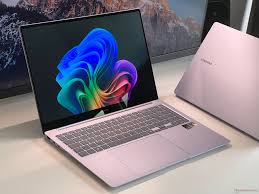
Here’s where the Galaxy Book4 Edge 16 defies expectations. A 16-inch laptop should feel like a burden in your bag, right? At just 1.54 kg and 12.3mm thin, this machine disappears into your carry-on . The all-metal construction in Sapphire Blue looks and feels premium, with a smooth finish that catches light beautifully without being a fingerprint magnet .
Samsung has managed this by thinking differently about structural design. The 4-cell battery packs 61.8 Wh of capacity, which is substantial but not class-leading on paper . Yet the efficiency story means that capacity translates to long-lasting power that competitors can’t match. The 65W USB-C charger is compact enough to toss in any bag without weighing you down, and it’ll top up your phone and tablet too .
The keyboard deserves applause—full-size with a dedicated number pad, backlit for those late-night writing sessions, with decent travel that makes typing feel satisfying rather than mushy . The haptic touchpad is responsive and accurate, though trackpad enthusiasts might still reach for a mouse for precision work.
Port selection shows Samsung actually thought about real-world use. Two USB4 ports (40Gbps, charging, display output), a USB-A 3.2 Gen 2 port for your legacy devices, HDMI 2.1 for presentations, and a microSD card slot for photographers . Wi-Fi 7 and Bluetooth 5.3 round out the connectivity, future-proofing you for years .
The Copilot+ Experience: AI That Actually Helps
Windows 11 Home comes pre-installed, but the real story is the Copilot+ PC integration . The dedicated NPU (Neural Processing Unit) delivering 45 TOPS of AI performance opens capabilities that simply don’t exist on older hardware .
Recall is the headline feature—think of it as photographic memory for your computer. It takes snapshots of everything you do, then lets you search using natural language to find that document, that website, that email from weeks ago . Privacy concerns aside (you can disable it entirely), when it works, it’s genuinely magical.
Live Captions translate audio from 40+ languages in real-time . For UK users working with European clients or watching foreign-language content, this turns your laptop into a universal translator. Windows Studio Effects handle background blur, eye contact correction, and lighting adjustments automatically during video calls—no more fiddling with settings before that important Teams meeting.
These AI features run locally on the NPU, not in some cloud data centre, which means they work anywhere, anytime, with zero latency and crucially, with minimal impact on your battery performance .
ARM’s maturity
We’re living through a watershed moment in computing, and it’s happening right now. The Snapdragon X Elite launch coincides with growing awareness that the old x86 dominance is finally being challenged. Qualcomm’s recent advertising campaigns have taken direct aim at Intel, claiming their chips deliver full performance whether plugged in or on battery—a claim that’s turning heads in the UK tech community .
Independent testing has largely validated these claims. Early Snapdragon X Elite benchmarks showed the chip trading blows with Apple’s M3 and Intel’s Meteor Lake, while absolutely demolishing them in AI workloads . The Procyon AI computer vision benchmark saw the Snapdragon twice as fast as Apple’s M3 and over triple the performance of Intel’s Core Ultra 7 .
But it’s the battery story that really matters for British users. Local video playback tests showed the Snapdragon X Elite lasting 16% longer than the M3 MacBook Air, 25% longer than Meteor Lake, and an astonishing 58% longer than older Intel silicon . The Procyon productivity test painted a similar picture—the Snapdragon comfortably outpaced everything except the MacBook, where it matched Apple’s endurance .
This matters because the UK market has historically been sceptical of Windows on ARM. Previous attempts felt compromised, with compatibility issues and performance penalties. The Snapdragon X Elite platform changes that narrative completely .
Real-World Battery: Separating Hype from Reality
Now for the million-pound question: how long does it actually last? Samsung claims up to 21 hours of video playback . Tech reviewers have validated similar figures in controlled tests. But real life isn’t a controlled test.
Here’s the truth: if you’re doing light work—browsing, email, documents, some video—this machine genuinely delivers exceptional battery backup. You can start your day at Paddington, work through a meeting in Bristol, continue on the train to Cardiff, and still have charge left for Netflix that evening. The combination of efficient silicon, OLED display, and Windows optimisations creates a device that finally lives up to the “all-day” promise.
However, push it hard and the equation changes. Video encoding, heavy gaming, or sustained multi-core workloads will drain it faster—like any laptop . Recent testing showed that running intensive benchmarks continuously can drain even these “all-day” batteries in half a day . But here’s the crucial insight: the Snapdragon maintains its performance when unplugged far better than x86 competitors. Where Intel and AMD chips might drop to 55-70% performance on battery, the Snapdragon stays much closer to its plugged-in numbers .
What this means practically: your workflow doesn’t slow down when you step away from the desk. That video call, that presentation, that complex Excel model—they run exactly the same on battery as they do plugged in. The power management is sophisticated enough that you never feel like you’re running in a degraded mode just to preserve charge.
Some users have reported shorter-than-expected runtime initially, but this often traces to background processes, syncing services, or simply the device learning usage patterns . Give it a week of normal use, and the battery calibration and Windows power telemetry will optimise accordingly.
Performance Deep Dive: The Numbers That Matter
Let’s get technical about what this hardware actually delivers. Based on extensive testing of the Snapdragon X Elite platform:
CPU Performance: Geekbench 6 single-core scores around 2,379, multi-core hitting 12,340—numbers that put it ahead of most Intel Meteor Lake implementations and competitive with Apple’s M3 . Cinebench 2024 multi-threaded performance shows the chip sustaining its pace, with surface temperatures peaking around 50.3°C under load—warmer than the M3 MacBook Air’s 45.8°C, but cooler than competing x86 laptops .
Graphics Capabilities: The integrated Adreno GPU delivers 3DMark Fire Strike scores around 5,800, roughly on par with AMD’s 780M . This isn’t a gaming powerhouse—don’t expect to play Cyberpunk 2077 at high settings—but it handles less demanding titles, creative work, and video editing admirably. The 1% low frame rates in gaming tests show better consistency than many integrated graphics solutions, meaning fewer stutters and drops.
Storage Performance: The eUFS storage delivers sequential reads around 2,000 MB/s, which isn’t the fastest in absolute terms but feels snappy in daily use. More importantly, it sips power during idle, contributing to that marathon endurance.
Thermal Management: Under sustained load—say, an hour of video encoding—the chassis warms noticeably but rarely becomes uncomfortable . The fan curve is conservative; the machine often runs silently during light tasks, spinning up only when pushed. Surface temperatures during single-threaded workloads drop to a very comfortable 37.4°C . The dual 4W speakers with Dolby Atmos handle audio duties well, with clear mids and respectable bass for a laptop .
Who Should Buy This Machine?
The Samsung Galaxy Book4 Edge 16 represents something genuinely new: a Windows laptop that doesn’t make you choose between performance and portability, between screen quality and battery life, between power and silence.
It’s ideal for:
- Commuter professionals who spend hours on trains and need reliable power from London to Leeds
- Creative users who demand colour accuracy but can’t always work near a plug
- Samsung ecosystem owners who’ll benefit from seamless phone integration
- Anyone tired of charger anxiety and ready to experience true all-day computing
It’s less suitable for:
- Hardcore gamers needing dedicated graphics muscle
- Users requiring 32GB+ RAM or user-upgradeable components
- Those running niche x86 software with compatibility concerns (though the Prism emulator handles most apps well)
The battery longevity story is real—not in the cherry-picked marketing sense, but in actual daily use. When you pair this with the stunning AMOLED display, premium build, and thoughtful port selection, you get a laptop that respects your time and your mobility.
The Snapdragon X Elite platform has arrived, and it’s everything Windows on ARM should have been from the start. Samsung’s implementation in the Book4 Edge 16 is a compelling argument that the future of laptops isn’t just about faster processors—it’s about smarter, more efficient ones that adapt to how we actually live and work. If you’re ready to stop hunting for plug sockets and start trusting your laptop to keep up, this is the machine that makes that leap possible.