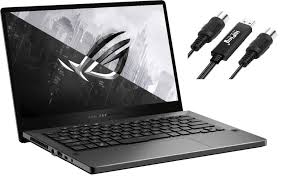
Gone are the days when students had to make a choice—haul a heavy gaming rig to halls for evening fragging sessions, or carry a sleek but underpowered ultrabook to lectures and suffer through laggy design software. Enter the machine that refuses to pick a side. The Asus ROG Zephyrus G14 has, for the past few years, been the gold standard for those who want it all, and the 2025 iteration sharpens this promise even further . It is the academic equivalent of a Swiss Army knife, seamlessly transitioning from a library study partner to a bedroom gaming beast, and even a portable creative studio.
The Ultimate Study Buddy: Portability Meets Practicality
University life is defined by movement. You’re dashing from a nine a.m. lecture in the humanities block to a group study session in the library, and finally to a coffee shop to power through a reading list. In this chaotic dance, weight is the enemy. The Asus ROG Zephyrus G14 understands this intimately. Tipping the scales at a mere 1.5kg and measuring just over 1.5cm thin, it slips into a backpack without announcement, feeling more like a textbook than a powerhouse gaming machine . Its design is a masterclass in understatement; the silver or dark grey aluminium chassis looks sophisticated and professional, easily passing for a high-end ultrabook rather than a flashy gaming rig .
But a light laptop is useless if it dies before your last seminar. Thankfully, the Asus ROG Zephyrus G14 holds its own on the endurance front. With a 73Whr battery and the incredibly efficient AMD Ryzen AI processor at its heart, you can comfortably push through a full day of note-taking, research, and web browsing. Real-world use suggests you can expect around five to six hours of screen-on time without desperately hunting for a plug socket . When you finally do need a top-up, the fast-charging capability means a quick break between lectures can give you a significant boost. It’s a laptop designed to keep up with your schedule, not dictate it.
Unleashing the Gamer Within: Power When You Plug In
When the sun sets and the textbooks close, the Asus ROG Zephyrus G14 undergoes a Jekyll-and-Hyde transformation. This is where its alter ego comes to life. While it sips power responsibly on battery, plugging it into the mains unleashes the full fury of its internals. Armed with up to an NVIDIA GeForce RTX 50-series graphics card (the RTX 5070 Ti being the sweet spot for most) and the top-tier AMD Ryzen AI 9 HX 370 processor, this 14-inch marvel chews through AAA titles for breakfast .
We’re talking about playing graphically demanding worlds in Cyberpunk 2077 with ray tracing overdrive and silky-smooth frame rates, or blasting through Call of Duty at well over 100fps on its gorgeous display . The secret sauce is its advanced cooling system. ASUS has packed a tri-fan setup inside this slim chassis to keep thermals in check, ensuring that your performance doesn’t wilt under pressure during those marathon gaming sessions . It manages the heat admirably, meaning you can keep it on your lap in a common room without feeling like you’re about to third-degree burn yourself . It’s the perfect release valve after a stressful day of deadlines.
A Canvas for Creators: Colour, Clarity, and Grunt
For the growing number of students in design, media, or architecture, the Asus ROG Zephyrus G14 is less of a luxury and more of a necessity. The centrepiece is its breathtaking 14-inch 3K (2880×1800) OLED display, often branded the ROG Nebula Display . With a buttery-smooth 120Hz refresh rate, it’s not just for gaming; it makes scrolling through documents feel fluid, but more importantly, it provides a vibrant, colour-accurate canvas for creative work. Covering 100% of the DCI-P3 colour gamut and being Pantone validated, it ensures that the hues you see are the hues you get, whether you’re colour-grading a short film or perfecting a digital illustration .
This visual prowess is backed by genuine horsepower. The combination of the high-performance CPU and RTX 50-series graphics, complete with NVIDIA Studio drivers, turns rendering times in Premiere Pro or Blender from a coffee break into a quick stretch . The inclusion of a microSD card slot is a subtle but massive win for photographers and videographers, allowing for instant transfers from cameras without needing a dongle . It transforms the laptop from a consumption device into a legitimate production tool that you can take on location shoots or use in the studio.
Living with OLED: Your Guide to Worry-Free Enjoyment
For many, the leap to OLED comes with a lingering concern: burn-in. The thought of a permanent ghost of the taskbar haunting your perfect display is a scary one. However, with a few simple habits and built-in features, enjoying the deep blacks and infinite contrast of the Asus ROG Zephyrus G14‘s screen is completely worry-free.
Firstly, it’s crucial to understand that the laptop has your back. Pixel refresh and other OLED care features are often handled at a firmware or hardware level, working automatically in the background to maintain the panel’s health . Think of it as a built-in insurance policy. Beyond that, a few proactive steps in Windows can dramatically extend the life and beauty of your display.
Start with the taskbar, the most common static element. Right-click on the taskbar, go to “Taskbar settings,” and enable “Automatically hide the taskbar in desktop mode.” This simple trick means the bar only appears when you hover over it, saving those pixels from constant, unrelenting use . Next, embrace movement. Instead of a static, high-contrast wallpaper, opt for a gentle, animated background or set your desktop to rotate through a collection of dark-themed images. This prevents any single area of pixels from being overworked . Windows itself has display settings to turn the screen off after a few minutes of inactivity—set this to a sensible timer like five minutes to give the panel a rest when you inevitably wander off for a tea refill .
Finally, let’s tackle colour calibration and that sometimes startling “over-saturation” of OLED. While the screen is stunning out of the box, you have control. For general use and browsing, the “sRGB” colour gamut setting in the display software provides a more standard, balanced colour profile that prevents colours from looking unnaturally vivid. For specific creative work, you can switch to the “DCI-P3” or “Native” modes to access the full, glorious colour space the panel is capable of . If you ever feel the screen is too bright in a dark room, the “flicker-free dimming” control offers a software-based way to lower brightness further than the standard slider, without introducing screen flicker .
The Asus ROG Zephyrus G14 is more than just a laptop; it’s an investment in versatility. It respects your need for a professional, portable tool for your studies, fuels your passion for gaming, and empowers your creative ambitions. It’s the one device that truly understands the multifaceted life of a modern student, proving that you don’t have to compromise—you can have it all, beautifully packaged in a 1.5kg chassis.