There is a peculiar kind of satisfaction that comes from breathing new life into something others have written off. In an age where consumer electronics are engineered for obsolescence, the Lenovo ThinkPad T440s stands as a quiet rebellion—a machine that, with a little attention, refuses to fade into irrelevance. More than a decade after its release, this ultraportable business laptop continues to attract a devoted following, and for good reason. The Lenovo ThinkPad T440s was never designed to be disposable. It was built for professionals who needed reliability, portability, and that legendary keyboard feel. But what makes it truly remarkable in 2026 is not what it shipped with—it is what it can become.
The narrative around older laptops often centres on replacement. Buy something newer, faster, shinier. Yet there is another path, one that is increasingly attractive to savvy users who understand that performance bottlenecks are rarely permanent. The Lenovo ThinkPad T440s offers something that many modern ultrabooks do not: genuine upgradability. Not everything is soldered down. Not every component is sealed behind proprietary glue. The machine invites you in, and with a few thoughtful investments, it rewards you with performance that can rival—and in some cases surpass—entry-level machines shipping today. This is the story of that transformation.
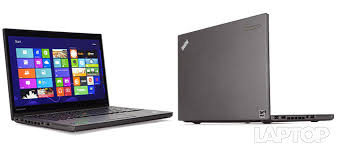
The Storage Revolution: SSD Upgrades That Change Everything
Let us begin with the most dramatic upgrade you can perform on a Lenovo ThinkPad T440s: the solid-state drive. Many of these machines left the factory with mechanical hard drives—spinning rust that, by 2026 standards, feels like watching paint dry while wading through treacle. Replacing that 2.5-inch mechanical drive with a SATA SSD is the single most impactful change you can make. Boot times plummet from over a minute to under fifteen seconds. Applications launch instantly. The machine feels responsive in ways it never did on day one.
But here is where the Lenovo ThinkPad T440s reveals its clever engineering. Beyond the standard 2.5-inch drive bay, the machine also features an M.2 slot—a narrow port originally intended for WWAN modules or cache drives. This slot accepts an M.2 SSD that is exactly 42mm in length, also known as the 2242 form factor. It is a tiny drive, barely larger than a postage stamp, but it opens up extraordinary possibilities. You can install a second SSD in the M.2 slot, creating a dual-drive configuration. The operating system resides on the M.2 drive, while the 2.5-inch bay holds a larger storage drive for files, media, and backups.
The upgrade process itself is straightforward, requiring little more than a small Phillips-head screwdriver and thirty minutes of patience. Enter the BIOS by tapping Enter during boot, disable the built-in battery from the Power menu, remove the back panel, and the M.2 slot is right there waiting. Users who have performed this upgrade report dramatic improvements. One owner noted that the Lenovo ThinkPad T440s is “not painfully slow when it has a second ram card and ssd,” describing the difference as “big.” Another user successfully installed Windows 11 on their Lenovo ThinkPad T440s, declaring that with a modest hardware upgrade, the machine ran “faster and smoother than it did the day it left the factory.”
Memory Matters: Unlocking the Lenovo ThinkPad T440s Full Potential
Storage is only half the equation. The Lenovo ThinkPad T440s came in two distinct memory configurations, and understanding which one you have is essential before planning an upgrade. Some models feature 4GB of soldered memory on the motherboard, with one accessible SO-DIMM slot that allows expansion to a maximum of 12GB. Other models have no soldered memory at all, relying entirely on the single slot, which can accommodate up to 8GB. The memory type is DDR3L—low-voltage DDR3 running at 1600MHz, in a 204-pin SODIMM form factor. It is worth noting that if you are running a 32-bit version of Windows, only 3 to 3.5GB of installed memory will be usable, so a 64-bit operating system is strongly recommended.
Why does memory matter so much? Modern web browsers are voracious consumers of RAM. A handful of tabs, a few extensions, and suddenly 4GB feels suffocating. Upgrading the Lenovo ThinkPad T440s to 8GB or 12GB transforms the multitasking experience. The machine stops swapping to disk. Tabs stay responsive. Applications remain snappy even under load. The cost of this upgrade is remarkably modest—the UK supplier Mr Memory lists 8GB modules for around £25. For that sum, you can effectively double or triple the usable memory of your machine. One user on the AntiX forum observed that adding a second RAM module enables dual-channel operation, further boosting performance. It is a textbook example of diminishing returns inverted: a small investment yields disproportionate gains.
The System Migration: Windows, Linux, and Beyond
An upgraded Lenovo ThinkPad T440s is a blank canvas for operating system exploration. The machine supports Windows 10, Windows 11 (with some creative installation methods), and a wide array of Linux distributions. The fourth-generation Intel Haswell processors found in the Lenovo ThinkPad T440s are well-supported across platforms, and driver compatibility is generally excellent.
For those inclined toward Linux, the Lenovo ThinkPad T440s is something of a darling. ThinkPads have long been celebrated in the open-source community for their hardware compatibility, and the T440s is no exception. Distributions like Ubuntu, Fedora, and Debian run “almost out of the box with very little tweaking.” Users have reported impressive battery life under Linux, with one achieving up to 24 hours of runtime using a combination of the internal battery, a 9-cell external pack, and power-management tools like TLP. Another user noted that after installing Debian on their Lenovo ThinkPad T440s, they experienced “much less fan noise” compared to Windows 10. For developers, writers, and anyone who values a clean, efficient computing environment, the Lenovo ThinkPad T440s running Linux is a compelling proposition.
Windows 11 presents an interesting challenge. Microsoft’s official hardware requirements exclude the Lenovo ThinkPad T440s due to its fourth-generation processor and TPM 1.2 module. However, the enthusiast community has developed reliable methods to install Windows 11 on unsupported hardware. One guide describes the process in detail, noting that Microsoft has shifted its stance—while the installation remains unsupported, the company no longer blocks these machines from receiving updates. The key is to replace the mechanical hard drive with an SSD before attempting the installation, as the default spinning drive will “choke Windows 11.” With that upgrade in place, users report that the Lenovo ThinkPad T440s handles Windows 11 without significant issues.
Beyond the Basics: Screen, Battery, and Keyboard
The upgradability of the Lenovo ThinkPad T440s extends well beyond storage and memory. The display is a frequent target for improvement. Many units shipped with a lacklustre 1366×768 TN panel that suffers from narrow viewing angles and washed-out colours. Replacing it with a 1920×1080 Full HD IPS display transforms the visual experience. The difference is night and day—richer colours, deeper blacks, and usable viewing angles that make the machine feel premium rather than dated. Replacement panels are readily available, with UK suppliers offering them for around £45. The installation requires care but is entirely feasible for someone comfortable with basic laptop repairs.
Battery life is another area where the Lenovo ThinkPad T440s excels through thoughtful design. The machine features Lenovo’s Power Bridge technology—a system that pairs an internal sealed battery with a removable external battery. This allows users to hot-swap the external battery without shutting down the machine, effectively extending runtime indefinitely. For users who invest in a high-capacity 72Wh external battery, the Lenovo ThinkPad T440s can achieve extraordinary endurance. One owner reported combining the internal 3-cell battery with a 9-cell external pack to achieve 24 hours of operation on a single charge. This is not a machine that leaves you tethered to a wall outlet.
The keyboard deserves mention as well. ThinkPad keyboards are legendary for their tactile feedback and comfortable typing experience, and the Lenovo ThinkPad T440s is no exception. The keys offer satisfying travel and a gentle curvature that cradles your fingers. For writers, programmers, and anyone who spends hours at the keyboard, this is not a trivial consideration. Replacement keyboards are available in multiple layouts, and the installation process is documented in Lenovo’s official maintenance videos. The machine is also compatible with the three-button touchpad from the T450, an upgrade that addresses one of the few criticisms of the original design.
The Economic Argument
There is a pragmatic dimension to all of this. The Lenovo ThinkPad T440s is not a new machine. It does not command new-machine prices. A well-maintained unit can be acquired for a fraction of the cost of a modern ultrabook, and the upgrades described here—SSD, RAM, perhaps a screen—represent a total investment that remains far below the price of even entry-level new laptops. You are not buying a machine; you are building one. You are choosing components that meet your specific needs rather than accepting whatever configuration a manufacturer decides to offer.
For students on a budget, for professionals who need a reliable secondary machine, for anyone who appreciates the value of a well-built tool, this approach makes compelling sense. The Lenovo ThinkPad T440s offers a combination of build quality, keyboard comfort, and upgradability that is increasingly rare in the modern laptop landscape. It is a machine that rewards effort. It is a machine that grows with you.
The Lenovo ThinkPad T440s is not for everyone. It is for the person who sees potential rather than obsolescence. It is for the person who understands that performance is not determined by a release date but by the components inside. With an SSD upgrade, a memory expansion, and perhaps a fresh operating system, this decade-old machine can outperform many of today’s budget offerings. It can handle office work, web browsing, light development, and creative writing with ease. It can run Windows 11 or Linux with equal grace. It can keep you productive for years to come.
The demand for breathing new life into older hardware is not going away. As new machines become increasingly sealed and non-upgradable, the Lenovo ThinkPad T440s stands as a reminder of what laptops used to be—and what they still can be, if we are willing to invest a little time and effort. The machine is waiting. The upgrades are available. The only question is whether you are ready to see what it can become.
4400MAH/48WH/6Cell Lenovo 45N1124 Laptop Battery for Lenovo ThinkPad T440 T440s
Buy Lenovo Laptop Battery online on Batteriesglobal.co.uk United Kingdom | Large selection of Lenovo Batteries | Enjoy best prices | Order now!
Our brand-new Laptop Battery compatible with Lenovo 45N1124 is engineered to deliver long-lasting and stable performance. It is designed to meet rigorous standards, ensuring full compatibility with devices such as the Lenovo ThinkPad T440 T440s. This battery comes with a one-year warranty and has passed essential safety certifications including CE, RoHS, and ISO9001. Choose our Lenovo 45N1124 battery for a power solution that combines quality, safety, and convenience. Invest in authentic performance and keep your Lenovo ThinkPad T440 T440s running like new.