In a world where our desks groan under the weight of multiple gadgets—a work laptop, a gaming rig, a tablet for media—the promise of a single device to rule them all is tantalising. Enter the OneXPlayer X1, a device that arrives with a bold proposition: why choose between a PC, a tablet, and a console when you can have all three in your rucksack? It is a fascinating feat of engineering that attempts to bridge the gap between the creative, the productive, and the playful. But in trying to be everything, can it truly deliver a satisfying experience? Let’s dive into the hybrid heart of the OneXPlayer X1 and see how it handles the balancing act.
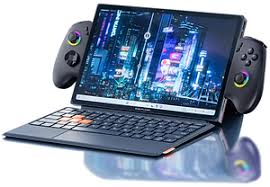
The Tablet Experience: More Than Just a Pretty Screen
At its core, stripped of its accessories, the OneXPlayer X1 is a striking 10.95-inch Windows tablet. The first thing you notice is the display; it is a genuine delight . With a 2.5K resolution and buttery smooth 120Hz refresh rate, it makes scrolling through documents or browsing the web feel incredibly fluid. Colours pop with vibrancy, making it an excellent companion for consuming media on the go, whether you are catching up on iPlayer during a commute or streaming a film in a hotel room .
Holding it as a tablet, however, requires a moment of adjustment. The weight of the device is substantial. Tipping the scales at around 789 grams, it is heavier than the average slate . It is a chunk of high-performance PC hardware, and you feel that heft. It is perfectly manageable for holding in your lap to watch a film or for note-taking during a meeting, but using it one-handed for extended periods can become a workout. The build quality feels solid and premium, instilling confidence that this investment is built to last, even if its edges can feel a little sharp against the wrists during prolonged use .
The Laptop Alchemy: Productivity on the Move
When the working day calls, the OneXPlayer X1 dons its laptop disguise. By attaching the magnetically backed keyboard, the tablet transforms into a surprisingly capable productivity machine. This is where the versatility truly shines for the British professional, whether you are hot-desking in a London co-working space or typing up reports in a local café.
The keyboard experience is a pleasant surprise. The keys offer decent travel, providing a tactile feedback that makes touch-typing feasible, and the trackpad is responsive and functional . This isn’t just a flimsy afterthought; it’s a usable tool for crafting documents or managing spreadsheets. The integrated kickstand, reminiscent of a Surface device, is robust and offers a wide range of angles, making it easy to find a comfortable viewing position even if you are working from an armchair .
There are, naturally, compromises inherent in this alchemy. The device is at its best on a flat, stable surface. Using it as a true “laptop” on your actual lap can be a fickle experience; a sudden movement might knock the magnetic keyboard loose, a quirk that reminds you this is a tablet first and a clamshell second . Yet, for the sheer convenience of carrying a full Windows 11 machine in a form this slim, it’s a trade-off many will find acceptable.
The Gaming Heart: Controllers and Performance
Of course, the “X1” moniker hints at its most ambitious form: the gaming rig. When you snap the detachable controllers onto the sides, the OneXPlayer X1 becomes a wide-screen handheld gaming PC. This is where the device gets interesting, and where opinions tend to diverge.
The controller layout follows an Xbox-style offset pattern. For many in the UK gaming community, this will feel instantly familiar and comfortable . However, the execution invites scrutiny. Some users note that the controllers can feel a little light and hollow, lacking the dense, premium weight of a standard console gamepad . The attachment mechanism, while functional, can have a slight wobble that saps confidence during an intense gaming session . There is also a quirk where attaching the controllers can interfere with the device’s sleep mode, a minor software irritation that OneXPlayer could hopefully smooth out with future updates .
Under the hood, the OneXPlayer X1 packs a punch. With options for Intel Core Ultra processors or the newer AMD Ryzen AI 9 HX 370, it handles a vast library of PC games admirably . You can expect to run the latest AAA titles on medium settings, or dive deep into the indie darlings of the Steam store where it truly excels. The inclusion of an OCuLink port is a masterstroke for the serious gamer, offering the ability to connect an external GPU (eGPU) at home to transform the X1 into a desktop replacement capable of 4K gaming . It’s this flexibility that defines the device: a portable gaming companion that can evolve into a living room powerhouse.
Navigating the Software Quirks
Running on Windows 11, the OneXPlayer X1 inherits the power and the pitfalls of a full-fledged operating system. You get the entire ecosystem—Chrome, Adobe, Microsoft Office—which is its greatest strength over locked-down tablets or game consoles . To help tame Windows for handheld use, OneXPlayer includes its own software front-end, OneXConsole. This hub allows you to tweak performance settings, adjust fan curves, and launch games, acting as a bridge between the OS and the gamepad .
However, this is where the “smaller brand” experience can surface. Users have occasionally reported software quirks, from driver niggles to update notes appearing in Chinese, which can be frustrating for those expecting a perfectly polished, console-like experience . It’s a reminder that this is a device for enthusiasts—people who are comfortable diving into Windows settings to optimise their experience. The battery life, too, is typical of a high-performance PC; you can get through a short flight playing games, but for all-day use, you will be grateful for the 100W GaN charger that can juice it up quickly .
A Master of Compromise?
So, does the OneXPlayer X1 succeed in its quest to be a one-device solution? The answer depends entirely on your expectations. It is not a flawless laptop, and it is not a perfect console. What it is, is a remarkably flexible companion for the digital nomad, the frequent traveller, or the gamer with limited space. It excels in the moments between the extremes—using it as a tablet to watch a film, flipping down the stand for a quick email, and then grabbing the controllers for a swift race in Forza before bed.
The OneXPlayer X1 asks you to embrace the compromises in exchange for the convenience of convergence. If you are looking for a device that can adapt to your lifestyle rather than forcing you to adapt to it, and you appreciate the ingenuity of a device that dares to be different, the X1 is a compelling vision of the future. It is a device that, despite its minor flaws, is remarkably easy to live with.