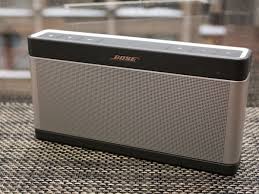
Imagine this: You’ve planned the perfect beach day. The sun is shining, friends are gathered, and your trusted Bose SoundLink Bluetooth speaker is ready to set the mood. You hit play, and for a few glorious hours, crystal-clear sound fills the air. Then, it happens—the music stutters, the LED blinks red, and silence falls long before the sunset. Your speaker’s battery, the unseen heart of your experience, has called it quits.
If this scene feels familiar, you’re not alone. The performance of your beloved Bose SoundLink—whether it’s the classic SoundLink III with its room-filling sound, or an earlier model—is only as good as the battery that powers it. This guide cuts through the confusion of replacement batteries. By the end, you’ll have a clear, actionable plan to safely restore your speaker’s legendary endurance, ensuring the music never stops prematurely again.
Part 1: Foundation – What Are You Really Buying?
A replacement battery is more than just a “power box.” It’s a critical component that affects your speaker’s safety, lifespan, and performance. Think of it as a heart transplant for your device—you need the right match and quality for a healthy, long life.
Decoding the Key Specifications
Let’s break down the tech jargon into simple terms:
| Specification | What It Means in Plain English | Why It Matters for Your Bose |
|---|---|---|
| Voltage (V) | The electrical “pressure” of the battery. | Must match exactly. Too high can fry internal circuits; too low will underperform or not work. |
| Capacity (mAh) | The size of the battery’s “fuel tank.” | Higher mAh = longer playtime. A quality replacement should meet or exceed the original capacity. |
| Chemistry (Li-ion/Polymer) | The type of “engine” inside. | Li-ion is standard. It dictates the battery’s weight, shape, and safety profile. |
| Connector Type | The “plug” that connects to your speaker’s motherboard. | The physical shape must be identical. A mismatch means it simply won’t connect. |
| Protection Circuit | The built-in “guardian angel.” | Prevents overcharging, over-discharging, and short circuits. Non-negotiable for safety. |
Bose SoundLink Battery Profile & Comparison
Knowing your specific model is the first step. Here’s a snapshot of key battery-related info across popular SoundLink lines:
| Speaker Model | Approx. Release Era | Original Battery Life | Key Note for Battery Replacement |
|---|---|---|---|
| Bose SoundLink III | Launched around 2014. | Up to 14 hours of playback. | Known for its substantial sound and battery life for its time. Older units likely need replacement now. |
| Bose SoundLink Revolve II | Current Series | Up to 13 hours. | Features IP55 water resistance; ensure replacement process doesn’t compromise seals. |
| Bose SoundLink Flex (2025 Gen) | Latest Model | Up to 16 hours. | IP67 rated for dust/water immersion. Battery access is specialized. |
| Bose SoundLink Plus (2025) | New for 2025. | Up to 20 hours. | Represents the latest in Bose battery tech and efficiency. |
Part 2: The Pitfalls – Battery Traps We’ve Stepped In
The market is flooded with options, but the wrong choice can range from a disappointing waste of money to a serious hazard.
The #1 Rule: Never Compromise on Certification
Always look for recognized safety marks like CE (European Conformity) and RoHS (Restriction of Hazardous Substances). These are not just stickers; they are audits that ensure the battery won’t overheat, leak, or catch fire under normal use. An uncertified battery is a gamble with your safety and your speaker’s health.
The Silent Speaker-Killer: Voltage Inconsistency
A battery with unstable voltage output is a silent killer. It can slowly degrade your speaker’s sensitive audio components, leading to distorted sound, lower maximum volume, or eventual motherboard failure—long before you realize the battery is to blame.
The Bose-Specific Warning: Beware of Counterfeits
Bose warns that counterfeit products, including batteries and speakers, are widespread. These fakes often use substandard cells with inflated capacity claims and lack essential protection circuits. Bose’s official warranty only covers products from Bose or authorized dealers. Using a counterfeit battery can void any remaining support for your speaker.
Part 3: Analysis & Recommendations – The True “Power Players”
Based on build quality, safety compliance, and user reliability reports, here are your best paths forward:
- For the Pursuit of Original Equipment Manufacturer (OEM) Quality & Stability:
Your best and safest bet is to contact Bose Support directly. They can provide service options or direct you to authorized parts suppliers. This ensures 100% compatibility and preserves your device’s integrity. It’s the recommended route for peace of mind. - For the Tech-Savvy User Seeking a Reliable Third-Party Option:
If an OEM part isn’t available or feasible, choose a reputable, specialist battery brand like iFixit or Nextech. These brands:- Clearly list certifications (CE, RoHS).
- Provide precise voltage and capacity data.
- Include high-quality connectors and protection circuits.
- Offer clear instructions and sometimes tools.
- For the Budget-Conscious (with a Major Caveat):
If you must explore general electronics retailers, proceed with extreme caution. Scrutinize product listings and reviews. Look explicitly for the phrases “CE/RoHS Certified” and “Includes Protection Circuit.” Avoid listings with overly generic descriptions, no brand name, or prices that seem too good to be true—they usually are.
Part 4: The Action Plan – Follow These Steps, No Mistakes
Ready to proceed? This checklist will guide you to a successful battery replacement:
- Identify Your Model: Find the exact model number (e.g., “SoundLink Bluetooth speaker III”) on the bottom of your speaker.
- Source Your Battery: Use the model number to search. Prioritize: Bose Support > Specialist Brands (iFixit, Nextech) > Vetted Retailers.
- Verify Before Buying: Confirm the voltage, connector type, and that safety certifications are listed.
- Prepare for Installation: Gather the correct screwdrivers (often Torx T6/T8). Watch a teardown video for your specific model on YouTube beforehand.
- Install Carefully: Work on a clean, uncluttered surface. Take photos as you disassemble to remember screw placements and connector orientations. Handle the battery and its connector with care.
- Charge & Test Fully: Before reassembling everything, plug in the speaker to ensure it charges. Then, play music at moderate volume for a few minutes to confirm stable operation.
Important Notice Regarding Counterfeit Products
Bose actively cautions consumers about the risks of counterfeit audio products, which can include replacement parts. These products may not perform to Bose’s standards and can pose safety risks. Bose’s limited warranty is only valid for products purchased from Bose or authorized dealers.
Restoring your Bose SoundLink speaker with a high-quality battery is more than a repair—it’s a revival. It’s about reclaiming the wireless freedom and rich sound you bought it for. By understanding what makes a good battery, avoiding the dangerous pitfalls of the market, and following a clear action plan, you can confidently give your speaker a new lease on life. Now, go power up your beats.