A faulty battery doesn’t just stop your survey; it can stop your business.
Imagine this: you’re on a critical site survey with your Geomax Zenith 15RTK, mapping the final boundaries under a tight deadline. Your high-precision GNSS receiver, a powerhouse capable of tracking multiple satellite constellations for centimeter-level accuracy, suddenly powers down. The culprit? An underperforming or failing battery. This scenario isn’t just an inconvenience; it’s lost time, revenue, and professional credibility.
This blog is your definitive guide to navigating the often-overlooked world of replacement batteries for your Geomax Zenith 15RTK. We will cut through the confusion, expose common pitfalls, and provide clear, actionable advice. By the end, you’ll know exactly how to choose a battery that unlocks your device’s full potential, ensures safety, and extends its operational life. Let’s power up your knowledge.
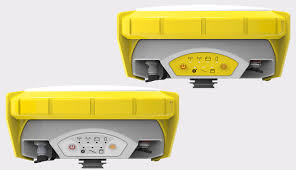
Part 1: Buying a Battery — What Are You Really Paying For?
When you buy a battery, you’re not just buying a power source; you’re purchasing productive field time, reliability in extreme conditions, and peace of mind. The right battery is the heart of your Geomax Zenith 15RTK, a device built for challenging environments with features like IP68 dust/water resistance and operation from -40°C to +65°C.
Let’s demystify the key specifications. Think of them as the battery’s resume:
- Voltage (V): This is the “pressure” of the electrical supply. Your Geomax Zenith 15RTK is designed to run at a specific voltage (like 7.4V). Mismatched voltage can damage sensitive electronics. It’s non-negotiable.
- Capacity (mAh/Ah): This is the “fuel tank size.” It tells you how much energy is stored. A higher capacity (e.g., 3400mAh vs. 2600mAh) means longer runtime between charges, directly translating to more hours in the field.
- Chemistry (Li-ion): Lithium-ion is the standard for its good energy density and rechargeability. Quality and internal construction matter more than the label.
- Certifications (CE, RoHS): These are your safety and quality assurances. They indicate the product meets specific environmental and safety standards.
The following table compares a standard original equipment manufacturer (OEM) option with a high-capacity upgrade, illustrating the tangible benefit of capacity:
| Specification | GeoMax ZBA201 (OEM Example) | GeoMax ZBA700 Replacement (Upgrade) |
|---|---|---|
| Compatibility | Zenith 15, 16, 25, 40 series | Geomax Zenith 15RTK & Compatible Models |
| Voltage | 7.4V | 7.4V |
| Capacity | 2.6Ah (2600mAh) | 3.4Ah (3400mAh) |
| Chemistry | Li-ion | Li-ion |
| Key Benefit | Guaranteed compatibility, OEM standard | ~31% longer theoretical runtime per charge |
Part 2: Battery Pitfalls — I’ve Stepped on These Landmines So You Don’t Have To
The cheapest battery is often the most expensive mistake you can make. The market is flooded with unbranded, uncertified cells that pose serious risks.
The cardinal rule: Never buy batteries without clear branding and legitimate safety certifications (CE, RoHS). These certifications are a baseline promise of safety. The dangers are real and extend beyond consumer gadgets to professional equipment. There have been widespread recalls of power banks from major brands due to defective cells that posed fire risks. In one extreme case, a faulty battery in a data center UPS caused a fire that interrupted nearly one-third of a country’s government services.
For your Geomax Zenith 15RTK, a subpar battery can lead to:
- Premature Failure: Inability to hold a charge, leaving you stranded on site.
- Device Damage: Poor voltage regulation can fry the GNSS receiver’s internal circuits.
- Safety Hazards: Overheating, swelling, or in worst-case scenarios, thermal runaway and fire—especially dangerous if charging in a vehicle or office.
- Voided Warranty: Using a non-OEM or uncertified battery may void your device’s warranty.
A consumer investigation found non-certified batteries sold in travel hubs, often with false power ratings. This deceptive practice exists in the professional sphere too, where a battery labeled 3400mAh might perform like a 2000mAh one.
Part 3: Brand Analysis & Recommendation — Who’s the Real “Power Player”?
Now, let’s translate knowledge into a smart purchase. Here’s a breakdown of your main options, tailored to different priorities.
1. For OEM Purists & Warranty Minded Users: “Choose GeoMax ZBA201”
- Why: This is the guaranteed, no-surprises fit. It’s engineered specifically for your device, ensuring perfect communication with the Geomax Zenith 15RTK‘s power management system. It’s the safest choice for maintaining your equipment’s warranty.
- Trade-off: You pay an OEM premium and accept the standard runtime (2.6Ah). It’s the reliable, but not necessarily optimal, choice.
2. For the Value & Performance Seeker: “Choose a Certified High-Capacity Replacement (e.g., ZBA700-type)”
- Why: This is the sweet spot for most professionals. You get a significant boost in runtime (like the 3400mAh capacity) at a lower cost than OEM. The key is to choose a reputable third-party brand that invests in quality cells, robust circuitry, and holds authentic certifications.
- Look for: Brands with clear contact information, positive user reviews for professional gear, and explicit mention of CE/RoHS. It balances cost, performance, and safety.
3. For the Budget-Conscious (Caution Advised): “Generic/Unbranded”
- Why: The initial price is undeniably low.
- The Stark Reality: This is high-risk. You gamble with your Geomax Zenith 15RTK’s safety and longevity. These batteries often use recycled or lowest-grade cells, lack proper protection circuits, and have falsified capacity ratings. The potential cost of device damage or failure far outweighs the upfront savings. Not recommended.
Your Decision Guide:
- “My Geomax Zenith 15RTK is under warranty, and I need a spare.” → Go with Option 1 (OEM ZBA201).
- “I need maximum field day length and trust a certified third-party.” → Go with Option 2 (Certified High-Capacity).
- “I own multiple units and need reliable, cost-effective batteries in bulk.” → Option 2 is your best research project. Find a certified, well-reviewed supplier.
Part 4: The Ultimate Checklist & Action Plan — Follow This, Don’t Go Wrong
Before you click “buy,” use this checklist. Copy it, paste it into your notes, and don’t compromise.
Your Pre-Purchase Checklist:
- Exact Compatibility: Does the listing explicitly state compatibility with “Geomax Zenith 15RTK” or the specific Zenith series?
- Voltage Match: Is the output voltage 7.4V?
- Capacity Goal: Have you decided between standard OEM capacity or a high-capacity upgrade for longer runtime?
- Certifications Visible: Can you see clear CE and RoHS marks on the product image or description?
- Brand Transparency: Is the manufacturer or brand name stated? Can you find information about them?
- Smart Charging: Do you have the correct, high-quality charger to safely charge the battery?
Your Action Plan:
- Audit: Check the current health and capacity of your existing batteries.
- Define Need: Decide if your priority is warranty-safe replacement (OEM) or extended runtime (Certified High-Capacity).
- Research: Use the checklist above to filter options. Read user reviews focusing on longevity and real-world performance.
- Purchase: Buy from a reputable supplier with a clear return policy.
- Label & Cycle: Label new batteries with the purchase date. Perform 2-3 full charge/discharge cycles to calibrate them before critical use.
Empowering your Geomax Zenith 15RTK with the right battery transforms it from a precision tool into a reliable field partner. You’ve now moved from wondering about milliampere-hours to understanding how to buy hours of productivity and safety. Make the choice that powers your work forward.