A warehouse manager once ordered a batch of cheap, unbranded batteries for his fleet of scanners. A week later, half his devices were dead, causing a two-day logistics shutdown and six-figure losses.
A genuine Honeywell 5000mAh extended battery can deliver up to 15.5 hours of continuous operation on a single charge, nearly doubling the work shift coverage compared to standard options. For professionals relying on Honeywell Dolphin 99EX and 99GX mobile computers, the battery isn’t just a component—it’s the heartbeat of daily operations in logistics, warehousing, and field services.
These rugged devices, built to survive 1.8-meter drops onto concrete, often outlive their original power sources. This guide will help you avoid the common pitfalls of battery replacement, understand what specifications truly matter, and make an informed choice that protects your investment and keeps your operations running smoothly.
1 Core Concepts: What Exactly Are You Buying?
When purchasing a replacement battery for your Honeywell Dolphin 99EX or 99GX, you’re not just buying a power cell. You are investing in continued productivity, device integrity, and data security.
These mobile data terminals are engineered for demanding environments. The Dolphin 99EX boasts an IP67 rating, making it dust-tight and capable of withstanding temporary immersion. The Dolphin 99GX has a solid IP64 rating, protecting against dust and water splashes. Both are built to survive repeated 1.8-meter (6-foot) drops onto concrete. A subpar battery can compromise this rugged design, failing at critical moments or, worse, damaging the device’s internal circuitry.
The heart of these devices is the Shift-PLUS power management system, designed to deliver a full shift of battery life. The right battery works in harmony with this system, while a poor-quality one can disrupt power regulation and shorten the device’s lifespan.
Decoding the Power Specifications
The key is to match the battery to your specific device model and work requirements. The following table breaks down the critical specifications you need to know:
| Specification | Honeywell Dolphin 99EX | Honeywell Dolphin 99GX | What It Means for You |
|---|---|---|---|
| Standard Battery | 3.7V, 3060mAh | Information not explicitly stated in sources, but similar system suggests comparable options. | The original capacity. Suitable for standard, less demanding shifts. |
| Extended Battery | 3.7V, 5000mAh | Information not explicitly stated in sources. | The productivity booster. Offers up to 15.5 hours of life, eliminating mid-shift anxiety. |
| Voltage (V) | 3.7V | (Assumed 3.7V for compatibility) | Must match exactly. Incorrect voltage can instantly damage your device. |
| Battery Life (Typical) | Standard: ~8-9 hrs / Extended: ~14.75-15.5 hrs | “持续一天的工作时间” (A full day’s work time) | Measured under specific scan/data transmission cycles. Real-world use varies. |
| Core Technology | Shift-PLUS Power Management | Shift-PLUS Power Management | A smart system that optimizes consumption. Only genuine batteries ensure full compatibility. |
| Physical Size | Increases device thickness from 39mm to 45mm | Likely similar form factor change. | The extended battery adds bulk but provides significantly more power. |
Understanding Capacity (mAh/Wh):
Think of the battery as a fuel tank. mAh (milliampere-hour) indicates its capacity. A 5000mAh battery can theoretically deliver 5000 milliamps for one hour. For the Honeywell 99EX-BTEC-1 extended battery, this translates to 5000mAh or 18.5Wh (Watt-hours). A higher mAh means a larger “fuel tank” and longer runtime between charges.
Voltage is Non-Negotiable:
Voltage is the electrical “pressure.” Your Dolphin 99EX or 99GX is designed for 3.7V. A battery with even a slightly different voltage can cause improper function, data loss, or permanent hardware damage.
2 Practical Pitfalls: The Hidden Costs of the Wrong Battery
The temptation to save money with a cheap, no-name battery is high, but the risks are higher. These pitfalls can turn a small saving into a major operational and financial disaster.
The Perils of No-Name, No-Certification Batteries
- Safety First—Or Else: Batteries without proper certifications (like CE, RoHS) are untested wildcards. They lack essential safety circuits to prevent overheating, swelling, or even combustion. In an industrial setting, this isn’t just an equipment failure; it’s a workplace hazard.
- The False Economy: A battery that costs 50% less but fails in 3 months offers no savings. You’ll be buying replacements more often, dealing with downtime, and risking damage to your expensive Dolphin terminal—a device that represents a significant investment.
- Performance Lies: Advertised capacities like “5500mAh” on generic batteries are often grossly inflated. You might get a fraction of the promised runtime, defeating the purpose of the purchase.
A major European logistics company, Deutsche Post DHL, standardized on Honeywell Dolphin 99EX devices for their reliability in tracking millions of parcels. Their choice underscores that in mission-critical operations, every component, especially the battery, must meet the highest standard to ensure uninterrupted workflow.
Why “Looks the Same” Isn’t Good Enough
Third-party batteries may physically fit but can fail in critical ways:
- Poor Communication: They may not integrate with the device’s Shift-PLUS system, providing inaccurate fuel gauge readings and shutting down unexpectedly.
- Inferior Cells: They use lower-grade lithium cells that degrade faster, losing capacity well before their promised lifecycle.
- Physical Imperfections: Poor casing quality can lead to fit issues, potentially damaging the device’s battery contacts.
3 Brand Analysis & Recommendations: Who Is the Real Power Player?
Not all replacement batteries are created equal. Your choice should align with your priorities: budget, guaranteed performance, or maximum durability.
The Recommendation Matrix
| Recommendation Category | Recommended Choice | Key Rationale | Ideal For |
|---|---|---|---|
| For OEM Quality & Maximum Stability | Genuine Honeywell Battery | Perfect compatibility with Shift-PLUS system. Maintains IP-rated seal. Backed by Honeywell’s warranty and service plans. | Companies with large fleets, mission-critical operations, and those utilizing Honeywell’s Extended Service Plans that cover battery replacement. |
| For Balanced Value & Verified Performance | Reputable Third-Party Brands (e.g., Cameron Sino, BST) | Brands with a long-standing reputation invest in better quality control and cells. They often provide legitimate capacity ratings and safety certifications. | Cost-conscious businesses that still prioritize reliability and need trustworthy performance for their Dolphin 99GX or 99EX. |
| For Your Specific Device Model | Honeywell 99EX-BTEC-1 (5000mAh) | The official high-capacity solution for the Dolphin 99EX. Delivers the promised 15.5-hour runtime and is designed for the device’s form factor. | Dolphin 99EX users in logistics or field service who need to work a full long shift or even a double shift without charging. |
| For the Absolute Lowest Budget | (Not Recommended) | While generic options exist, the risks of downtime, safety issues, and device damage far outweigh the initial savings. | – |
To simplify your decision, follow this logical flow based on your primary need:
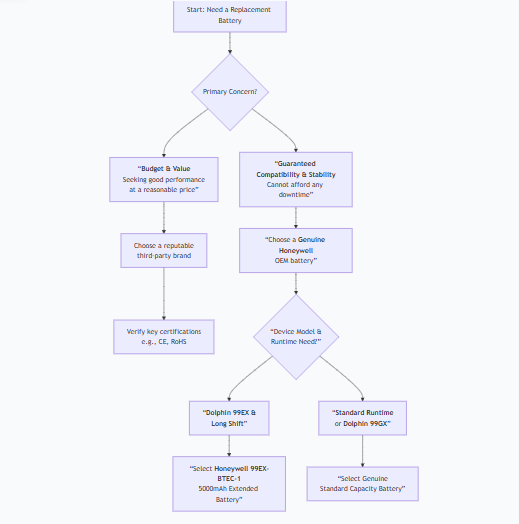
4 The Ultimate Checklist & Action Guide
Follow these steps to ensure a flawless purchase and installation.
Pre-Purchase Verification Checklist:
- Model Match: Confirm the battery is explicitly listed for Honeywell Dolphin 99EX or 99GX.
- Capacity Check: Decide between standard (~3000mAh) or extended (5000mAh) based on your shift length.
- Certification Scan: Look for CE, RoHS markings. For OEM batteries, verify Honeywell part numbers (e.g., 99EX-BTEC-1).
- Vendor Vetting: Purchase from authorized distributors or highly-rated, specialized suppliers.
Installation & Maximizing Lifespan:
- Power Down: Always turn off the device before swapping batteries.
- First Charge: For a new battery, allow a full, uninterrupted charge (overnight is ideal) to condition the cells.
- Smart Charging: Avoid constantly draining the battery to 0%. Partial discharges followed by charges are better for lithium-ion health.
- Environmental Care: Store and use the device within its specified temperature range (-20°C to 50°C). Extreme heat is a battery’s worst enemy.
The right battery is a strategic investment in your team’s productivity and the longevity of your rugged hardware. By choosing a power source that matches the engineering quality of your Honeywell Dolphin terminal, you secure the reliable performance your business depends on.