Ever found yourself trapped in a compromise? You crave a vast, immersive screen for your spreadsheets, designs, or marathon research sessions, but you dread the accompanying bulk of a traditional large laptop. You need performance that won’t stutter during a video render, but you also dream of a clean, professional design that doesn’t scream “gaming rig.” If you’ve been nodding along, you’ve experienced the universal dilemma of choosing a large-screen laptop. This blog exists to guide you through that exact maze.
By the end of this deep dive, you’ll have a crystal-clear understanding of whether a specific machine—the HUAWEI MateBook 16—is the key to unlocking your productivity without the typical penalties. We’ll move beyond marketing specs and into the realm of real-world performance, design intelligence, and the kind of all-day battery life that genuinely changes how you work.
Introduction: A New Blueprint for Big-Screen Productivity
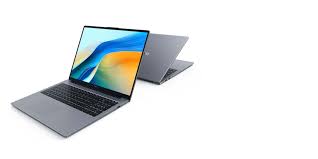
The HUAWEI MateBook 16 isn’t just another laptop with a big display. It represents a deliberate philosophy: that a large-screen machine must be a holistic productivity partner, not a one-trick pony. It targets creators, professionals, and power users who prioritize screen real estate and processing muscle but refuse to sacrifice portability, build quality, or endurance. In a landscape where premium laptops often force you to pick two out of three (performance, portability, battery), the MateBook 16 audaciously attempts to deliver on all fronts. We’ll dissect this claim, starting from its core architecture.
Engine Room: Performance That Fuels Ambition
At its heart, the MateBook 16 is powered by AMD’s Ryzen 7 5800H, a formidable 8-core, 16-thread processor built on the efficient 7nm Zen 3 architecture. This isn’t a low-power variant; it’s a true 45W TDP “H-series” chip, typically found in gaming laptops and mobile workstations. Huawei’s engineering allows this processor to sustain a high sustained performance output of around 54W to 55W in its high-performance mode, ensuring that heavy tasks don’t cause sudden slowdowns.
Paired with this CPU is 16GB of dual-channel DDR4 memory and a fast NVMe PCIe SSD. The solid-state drive speed is a crucial yet often overlooked aspect of a responsive feel. In tests, the included drive achieved impressive sequential read/write speeds, translating to near-instantaneous application launches and quick file transfers. This core hardware trio forms a foundation built for multitasking, complex calculations, and handling large files with ease.
A Window to Your Work: The “Productivity Screen” Redefined
The centerpiece is, undeniably, the 16-inch display. But its magic lies not just in size, but in proportion and precision. It boasts a 3:2 aspect ratio, a game-changer for productivity. Compared to a standard 16:9 screen, this taller format shows significantly more vertical content—think extra lines in a document, more rows on a spreadsheet, or a longer timeline in your editing software. It effectively crams a larger canvas into a more compact body, allowing the laptop to maintain a footprint similar to many older 15.6-inch models.
With a sharp 2520 x 1680 (2.5K) resolution, it offers crisp detail. More critically for creators, it delivers outstanding color fidelity. It covers 100% of the sRGB gamut and achieved an average Delta E color accuracy value of less than 1 in reviews, a mark that rivals professional monitors. This high color accuracy display means what you see is true-to-life, essential for photo editing and design work. The screen is also factory-calibrated and even earned a TÜV Rheinland professional-grade color certification, a first for a laptop.
Built to Last: Design, Portability, and Endurance
Crafted from a single block of aluminum, the MateBook 16 exudes a minimalist, boardroom-ready aesthetic. The ceramic-sandblasted surface feels premium and resists fingerprints. At 1.99kg and 17.8mm thick, it’s not the absolute lightest, but it strikes a remarkable balance for a device with this much screen and a high-performance cooling system inside.
The keyboard offers a comfortable typing experience, and the oversized touchpad—46% larger than previous models—is a smooth, glass-covered pleasure to use. For connectivity, it provides a practical mix: two USB-C ports (both supporting charging and data), two USB-A ports, a full-size HDMI, and a headphone jack. This variety means fewer dongles in your bag.
The cornerstone of its portable workstation appeal is its massive 84Wh battery. In controlled office productivity tests, it has achieved results of up to 16 hours of use, a phenomenal figure for a performance-oriented laptop. This is the engineering that enables true mobile computing solutions, freeing you from the constant search for an outlet.
The Intelligent Edge: Ecosystem and Smart Features
Where the MateBook 16 pulls ahead of generic Windows laptops is its integration into the Huawei ecosystem. The “Multi-Screen Collaboration” feature is its party trick. By simply tapping a compatible Huawei phone on the NFC area in the touchpad, your phone’s screen mirrors onto the laptop. You can drag and drop files between devices, operate mobile apps directly with the laptop’s mouse and keyboard, and even have multiple phone windows open simultaneously. It seamlessly bridges the gap between devices, turning your laptop into a command center.
Other thoughtful touches include a pop-up webcam hidden in a keyboard key for privacy, a fingerprint reader integrated into the power button, and surprisingly robust dual front-firing speakers that deliver clear, spacious audio for presentations or media consumption.
Deep Dive: A Performance and Thermal Verdict
Raw benchmarks tell a compelling story of consistent, well-cooled power. Here’s a snapshot of its capabilities:
| Aspect | Performance Data & Observations |
|---|---|
| Core CPU Performance | Cinebench R20: ~4,600 pts (Multi-core). Stable long-term power output of 55W under load, with peak temperatures around 88°C. |
| Graphics & Rendering | Integrated AMD Radeon Graphics: Suitable for light gaming, 4K video playback, and basic photo work. PCMark 10 Digital Content Creation: ~2,077 points, competitive with some entry-level discrete GPUs. |
| Storage Speed | SSD Sequential Read/Write: ~3,400 MB/s and ~2,700 MB/s respectively, ensuring fast boot and file operations. |
| Thermal & Acoustic Stability | Dual-fan, dual-heatpipe system. Under sustained dual-load, keyboard surface stays comfortably cool (AWSD area ~31°C). Fan noise remains a low, non-intrusive hum (~42 dBA at max load), a testament to efficient system power management. |
Who Is This Powerhouse For?
The HUAWEI MateBook 16 leaves a distinct impression. It’s a thoughtfully engineered, no-compromise large-screen laptop for the professional who values a pristine screen, all-day endurance, and clean design as much as raw processing muscle.
It is ideal for:
- Content Creators & Designers who need color-accurate screens and reliable performance for Photoshop, Lightroom, or moderate video editing.
- Data Analysts, Programmers, and Researchers who thrive with multiple windows and documents open, benefiting immensely from the 3:2 screen and sustained CPU power.
- Premium Business Users seeking a powerful, elegant, and ecosystem-connected laptop for presentations, complex modeling, and travel.
Consider alternatives if: Your primary need is high-end 3D gaming, heavy 4K/8K video editing, or you require absolute maximum portability above all else.
Ultimately, the MateBook 16 successfully shatters the old myth. It proves you can have a expansive, precise display and potent performance without settling for a bulky chassis or hopelessly short battery life. It’s a compelling argument for intelligent, human-centered design in the high-performance computing space.